Google Business Profile for Clinics: Setup and Optimization Guide
Google Business Profile for clinics and doctors: set up the listing, pick categories, handle doctor profiles, earn reviews and reply without breaking privacy.

In this guide12 sections
- Why does a Google Business Profile matter so much for a clinic?
- How do you set up and verify a clinic’s Business Profile?
- Which category should a clinic choose?
- Should doctors at a practice have their own profiles?
- What should a clinic fill in on its profile?
- How can a clinic get more Google reviews?
- How should a clinic reply to Google reviews?
- Do Google posts and updates help a clinic?
- Which Business Profile numbers should a clinic track?
- Which Google Business Profile mistakes cost clinics patients?
- How long until a better profile brings more patients?
- Want your practice’s profile checked?
How do you optimize a Google Business Profile for a clinic?
Verify one profile for each practice location, choose the most specific accurate primary category, and fill in every field: hours, services, a booking link, photos and a link to the matching page on your site. Then earn reviews from patients steadily and reply to them without revealing anything about anyone’s care. Measure the result in calls, direction requests and bookings.
I’m Muhammad Haseeb Sheikh, a medical SEO specialist, and for most of the clinics I work with the Google Business Profile brings in more patients than any page on the website. One allergy clinic’s profile logged 891 calls in a single quarter. Yet it is often set up once by a receptionist and never touched again. This guide covers a Google Business Profile for clinics from start to finish: setting it up, the categories, doctor profiles, reviews, replying safely, and what to measure. It works the same for practices in the US, the UK, Canada and Australia.
Why does a Google Business Profile matter so much for a clinic?
Because patients choose a clinic nearby, and Google answers nearby searches with the map. When someone searches “pediatrician near me” or “allergist” plus a town, the map results and the profiles in them come before the ordinary results, and many patients call straight from the profile without ever opening the website.
Google ranks those map results on relevance, distance and prominence. The profile decides most of the first, and reviews decide much of the third. Distance is fixed, so the profile is where a practice has the most control.
How do you set up and verify a clinic’s Business Profile?
One verified profile per location, owned by the practice.
- Search for an existing profile first. Search the practice name and address on Google Maps. Many clinics already have a profile created by Google or a former staff member. Claim it rather than creating a second one.
- Use a practice account, not a personal one. Sign in with an email the practice controls, then add staff and any agency as managers. When a manager leaves, the practice keeps the profile.
- Verify it. Google offers the options it chooses for each business, now often a short video showing the signage, the entrance and the reception. Film the real premises in one take.
- Match the name to the sign. The business name should be what is on the door and the letterhead. Adding “Best Allergy Doctor Chicago” to the name breaks Google’s guidelines for representing your business and is the most common reason clinic profiles get suspended.
If a profile is already suspended or missing from Maps, my guide to why a clinic isn’t showing on Google walks through every cause in the order to check them.
Which category should a clinic choose?
The most specific category that is true. Google asks businesses to pick categories that complete the sentence “this business is a”, and the primary category carries the most weight in matching searches.
- Choose the specialty, not the building. An allergy practice should be “Allergist”, not “Medical clinic”. A family practice should use the family practice physician category rather than a general clinic one.
- Add secondary categories sparingly, only for care the practice really provides, such as “Pediatrician” for a family practice with its own pediatric clinicians.
- Check what ranks. Search your main service and town and look at the categories the top three profiles use. They tell you which category Google already connects with that search.
For an allergy practice, SEO for allergy and immunology practices shows how the categories line up with the pages on the website.
Should doctors at a practice have their own profiles?
They can, and for an established practice with several clinicians it often helps. Google treats doctors, dentists and similar public-facing professionals as individual practitioners with their own rules:
| Situation | What Google’s guidelines allow |
|---|---|
| Several doctors at one practice location | One profile for the practice, plus one for each doctor, named with the doctor’s name only |
| One doctor at a branded practice | A single profile named “Practice name: Doctor’s name” |
| A department with its own entrance and team | Its own profile, with a distinct name and category, such as a hospital’s dermatology department |
| Nurses, receptionists and support staff | No profile |
| One doctor with several specialties | One profile, not one per specialty |
Practitioner profiles bring their own reviews and their own searches, such as patients looking up a doctor by name. They also add work: each needs correct hours, the same address and phone format as the practice, and someone watching its reviews. When a doctor leaves, mark their profile as moved or closed rather than leaving it pointing at the practice.
What should a clinic fill in on its profile?
Everything Google offers, kept accurate. Google says complete, detailed information helps it match a profile to searches, and patients compare profiles side by side.
- Address and service area: the real address patients visit, entered the same way as on your website.
- Phone number: the number that reaches your front desk. Keep the same main number on the profile, the website and every directory; if you track calls on the website, don’t put a different number on the profile.
- Hours: regular hours, plus holiday and special hours set in advance. A patient who drives to a closed clinic on a holiday leaves a review.
- Website link: for a multi-location practice, link each profile to that location’s page, not the home page.
- Appointment link: the online booking page, if you have one, so patients can book from the map.
- Services: each treatment or condition you see patients for, in the words patients use, such as “allergy testing” and “allergy shots”.
- Description: two or three plain sentences about who the practice treats and how. No keyword lists, no prices that will go out of date.
- Photos: the outside of the building and the entrance, so patients recognize it, the reception and treatment rooms, and the clinicians. Real photos, updated when anything changes.
Each service in the profile should have a matching page on the website, because the profile and the site support each other. Google uses the site to understand the profile, and a patient who taps through expects to land on the treatment they searched for.
How can a clinic get more Google reviews?
Ask every patient, every time, as part of the visit. Practices that ask consistently earn reviews steadily, and a steady flow matters more than a burst.
- Make the ask routine: at checkout, in the follow-up text or email, with a short link or QR code that opens the review form.
- Ask everyone, not only happy patients. Sending only satisfied patients to Google, a practice known as review gating, breaks Google’s rules on fake engagement.
- Never offer anything in return. No discounts, no raffle entries, no gift cards.
- Don’t write reviews for patients or have staff review the practice.
- Spread reviews across practitioners if doctors have their own profiles, so each one builds trust of its own.
Review count, rating and how recent the reviews are all show on the map, next to your competitors. In the allergy clinic I worked with, a repeatable review rhythm was one of the changes behind its growth, which the healthcare SEO case study covers in full.
How should a clinic reply to Google reviews?
Reply to every review, briefly, and never confirm that the reviewer is a patient. A reply that says “we’re sorry your test results took so long” tells the world that person was treated at your practice.
This is not a theoretical risk. In the US, the Department of Health and Human Services has fined practices for revealing patient information in review replies, including a $30,000 settlement with a New Jersey provider and a $10,000 settlement with a Texas dental practice. Patient confidentiality rules in the UK, Canada and Australia point the same way.
Safe replies follow a simple pattern:
- For a positive review: “Thank you for taking the time to leave a review. We’re glad to hear it.” Nothing about the visit, the condition or the treatment.
- For a negative review: “We take all feedback seriously and want to understand what happened. Please call our practice manager on [main number] so we can talk directly.” No defense of the care given, and no details, even if the reviewer shared them first.
- For a review that breaks Google’s policies, such as one from someone who was never at the practice or one with hateful content, report it through the profile rather than arguing in public.
Do Google posts and updates help a clinic?
They keep the profile current and give patients reasons to choose you, though they move rankings far less than categories and reviews. Post when something real changes: new clinicians, extended hours, flu shot clinics, a new service. A few useful posts a month beat a weekly post written for the sake of it.
Watch for edits you didn’t make. Anyone can suggest changes to a profile, and Google sometimes applies them. Check the profile every month for a changed phone number, hours or category.
Which Business Profile numbers should a clinic track?
The actions patients take, from the profile’s performance report: calls, website clicks, direction requests and bookings. Views on their own tell you little; views without actions usually mean the profile isn’t convincing.
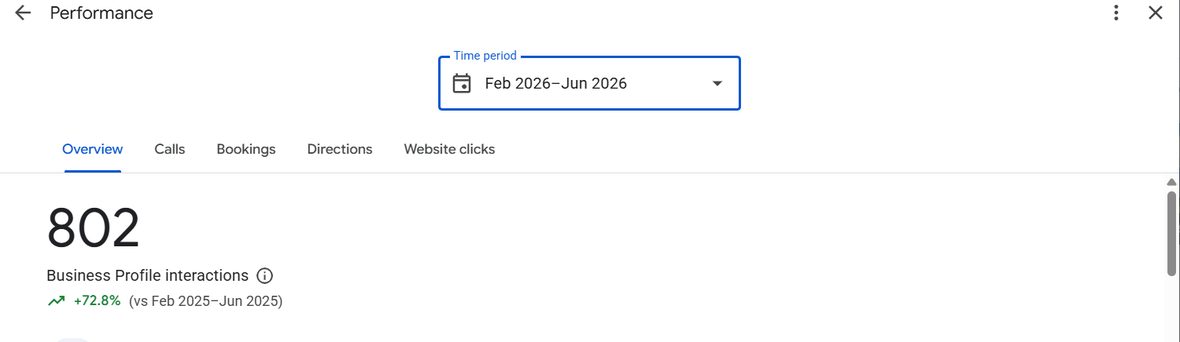
Vitality Direct Primary Care · 802 Business Profile interactions from February to June 2026, up 72.8% on the same months a year earlier, from the practice’s own profile. The full story is in the Vitality DPC case study.
Compare each month with the same month last year as well as last month, because patient searches are seasonal. The full list of numbers worth a monthly look, website and profile together, is in the SEO metrics a medical practice should track.
Which Google Business Profile mistakes cost clinics patients?
| Mistake | What it costs | The fix |
|---|---|---|
| Keywords or a city added to the business name | Suspension, and the profile vanishes from Maps | Use the name on the sign |
| “Medical clinic” as the only category | Invisible for specialty searches | The most specific true primary category |
| Two profiles for one location | Google is unsure which to show | Merge or remove the duplicate |
| Old hours, or no holiday hours | Wasted trips and angry reviews | Set special hours ahead of every holiday |
| A different phone number on the profile and site | Weaker trust in the practice’s details | One main number everywhere |
| Review replies that mention the patient’s care | A privacy complaint, and potentially a fine | Generic replies that move the conversation offline |
| Profile owned by a former employee or old agency | Locked out of your own listing | Practice-owned account, with others added as managers |
How long until a better profile brings more patients?
Fixes to verification, categories and the business name can show within a few weeks once Google processes them. Review growth and new service pages usually take three to six months to move map rankings in a meaningful way. Distance never changes, so a single location will always rank best close to the clinic.
The profile is also one of the sources AI assistants use when they recommend a local practice, which is part of AI search optimization for clinics.
Want your practice’s profile checked?
A Business Profile review is part of every clinic I take on through my medical SEO service for clinics: the categories, the practitioner profiles, the review routine and the pages behind them. Book a free discovery call to talk it through, or ask for the written diagnostic instead. If you’re an agency managing profiles for clinic clients, I also do this work under your brand as white-label local SEO.
Frequently asked questions
Should each doctor at a clinic have their own Google Business Profile?
Google allows it. Public-facing practitioners such as doctors and dentists can have their own profiles, alongside one profile for the practice at that location. If a doctor is the only practitioner at a branded practice, Google prefers a single profile named as the practice followed by the doctor's name. Support staff should not have profiles.
What is the best Google Business Profile category for a medical clinic?
The most specific category that completes the sentence "this business is a", such as Allergist, Pediatrician or Family practice physician, rather than a general Medical clinic. Add secondary categories only for care the practice really provides.
Can a clinic reply to Google reviews?
Yes, and it should, but never confirm that the reviewer is a patient or mention their care. US regulators have fined practices for revealing patient information in review replies. Thank the reviewer in general terms and invite them to contact the practice directly.
How long does it take for a clinic's Google Business Profile to rank?
Fixes to verification, categories and profile details can show within a few weeks. Growth from reviews and better service pages usually takes three to six months, and distance from the searcher always limits how far a single location reaches.